Showing posts with label Technology. Show all posts

HP Mini 210 With Windows 7

633984308104140000hp-mini-210-hd-edition

633983281079360000hp-mini-210

The HP Mini 210-1090NR 10.1-Inch Netbook is prepare to be noticed when you take this Netbook out on the town. Small, slim and stylish, the HP Mini 210 lets you surf the web, stay connected, and be entertained wherever you go. Amp up the fun by playing videos and music or showing off your photos. Exclusive, integrated software keeps you in sync with your life by letting you e-mail, chat, and instantly access your files from anywhere. Take just what you need And leave the rest on your primary PC. At less than one inch thin and starting at just 2.69 pounds, this ultra-compact PC won’t weigh you down. You’ll enjoy a 16:9 10.1″ diagonal Bright View Infinity display and nearly full-size keyboard

HP Mini 210-1090NR Technical Details

  • Intel Atom Processor N450 (1.66 GHz, 512 KB L2 Cache)
  • 1GB DDR2 System Memory (1 DIMM)
  • 250GB (7200RPM) Hard Drive (SATA
  • Genuine Windows 7 Starter, * Up to 9.75 Hours of Battery Life

Ultra-slim Dell Latitude 13 Unveiled

Dell had introduced an ultra-portable Vostro 13 last December. The company has now unveiled a new ultra-slim Latitude 13. With similar form factor, Latitude 13 appears to be a re-branded Vostro 13 notebook. Its close resemblance to Adamo laptop makes Latitude 13 thin and light laptop for business users. No details about the price and availability of this device are out as yet.
The new Latitude 13 will come with Enterprise features like ImageDirect Services which will allow IT users to create, update and deploy several system images on Latitude 13 models at once. Unlike Vostro 13, Dell will offer SSD option for Latitude 13 along with slew of other features like full disk encryption, Computrace recovery services and Trusted Platform Module.
Along with pre-installed Citrix client (for U.S. only), the Latitude 13 also features WiFi 802.11 b/g/n, Bluetooth and WWAN Wireless options along with Blu-ray drive. No details about the processor, memory and storage limits were available. Dell might use Intel's low-voltage processor just like in Vostro 13.
After all, thin laptops are an "in-thing" these days. Both business professionals and consumers look forward to buy slim and light form factor laptops for average computing work. The most sought feature even in ultra-portable notebooks is the battery life. Let's hope the new fleet of ultra portable and ultra slim notebooks offer longer battery life than the previous generation bulky machines.

109087_dell-500

ViewSonic Unveils New MovieBooks

ViewSonic claims to enhance movie watching experience with its four new MovieBook models. It's not just about watching movies anymore; it's about watching HD content. These MovieBooks will support playback of up to 1080p HD video content and select models would also feature touchscreen.

VPD400-MovieBook_black

ViewSonic has brought out four MovieBook models of different screen sizes - VPD550T, VPD513T, VPD403 and VPD313T. Out of these four VPD550T features ultra-high 800x480 resolution supporting touchscreen. This touchscreen MovieBook model has 8GB internal memory and supports 1080p HD video output. Another VPD513T model has same ultra-high 800x480 resolution screen that supports 720p content and offers 8GB storage. Both these MovieBooks have HDMI out for connecting them to external and bigger displays.

For a bit compact screen size like that of a PlayStation Portable, VPD403 MovieBook offers 480x272 resolution (yes, that's iPhone/iPod screen resolution) and video out support of 720p HD content. This portable movie book offers support for variety of formats and has 4GB internal storage. Going more compact, VPD313T has 3-inch screen size supporting 480x272 resolution with 480p screen and supports variety of audio-video formats.

The interface looks customized and based on Linux Kernel. However, we anticipate more portable movie and entertainment players loaded with Android OS in future.

Besides watching movies, one can also read books, watch photos and listen to music on any of these MovieBooks. The prices of the MovieBooks are as follows:
200 - (Rs. 9,600 approx.)
190 - (Rs. 9,100 approx.)
150 - (Rs. 7,200 approx.)
140 - (Rs. 6,700 approx.)

The new MovieBooks will start shipping in the first quarter of the year. Specifications and details of the new MovieBooks were not available.

Apple Mac Mini 2.53GHz

Apple's little tiffin box shaped Mac Mini has received another shot in the arm in the form of an updated hardware. Folks at Apple sent us the 2.53 GHz model for review and we ran it through our benchmarks to see how much better this new model is.

108498_intro

Bundle

  • Mac mini
  • Mini-DVI to DVI Adapter
  • 110W power adapter and power cord
  • Install/restore DVDs
  • Printed and electronic documentation

108498_105490_bundle

Design & Construction
The Mac Mini design has largely been unchanged since its debut in 2005. It still remains one of the best-looking compact computers that you can find anywhere. The steel grey sides with milky white top and the large Apple logo look simple and elegant. It is difficult to believe that this is actually a full-fledged computer encased within something that looks like a fancy tiffin box.

108498_front

The front side has the slot loading SuperDrive. As is usual for desktop Macs there is no physical eject button, which is in sync with Apple's philosophy of having the minimum number of buttons possible, and the only way to eject the disc is through the OS. On the right edge of the slot is a receiver for the wireless remote. Below that is a tiny white LED light that indicates the status of the Mini.

108498_back

Now let us move to the rear side, as the sides are completely deprived of anything. The rear side has a plethora of ports, which includes 5 USB 2.0 ports, Firewire 800 port, mini-DVI port, Mini DisplayPort audio In/Out and power port. The 5 USB ports might sound exciting but it is important to remember that of these, two will be reserved for the keyboard and mouse. This means you'll be left with only three (unless you use a wireless combo that will have a single Bluetooth dongle, in which case you'll end up with four ports).


The rear location of USB ports is inconvenient, especially if you plug in or remove portable drives often. I assume Apple refrained from placing the ports at the front or the sides to have a clean and uncluttered design, a decision, which from the point of view of aesthetics, makes perfect sense but doesn't when you think of ergonomics.


The ventilation on the Mac Mini is placed at the back and at the bottom around the edges. The Mini runs surprisingly cool with the top and the sides always being lukewarm at the most, even during the most processor intensive activities. And then there is the time-honored Mac ability of running quiet as a whisper. The only sound it ever makes is of the drives kicking in softly when you turn it on or it comes out of Sleep mode.


Hardware & Software
The new Mac Mini comes in two variants. The lower model has a 2.26 GHz Intel Core 2 Duo processor whereas the higher end model has 2.53 GHz Core 2 Duo. This is a major step up from the previous generations 2.0 GHz processor, on both the models. The older model had 1 GB and 2 GB DDR3 RAM respectively, but the newer version has 2 GB for the base model and 4 GB for the higher end model. Hard drive capacities have gone up from 120 GB to 160 GB on the base model and the higher end model retains the 320 GB hard drive of the previous higher end model.


The rest of the hardware remains the same with a NVIDIA GeForce 9400M graphics processor with 256MB of DDR3 SDRAM (shared with main memory), 8x slot loading SUperDrive, Wi-Fi 802.11n, Bluetooth v2.1 + EDR, built-in Gigabit LAN and a built-in mono speaker.


The new Mac Mini now comes with Mac OS X Snow Leopard, which includes iTunes, Time Machine, Quick Look, Spaces, Spotlight, Dashboard, Mail, iChat, Safari, Address Book, QuickTime, iCal, DVD Player, Front Row, Xcode Developer Tools, along with iLife '09, which includes iPhoto, iMovie, iDVD, iWeb, GarageBand.

Performance
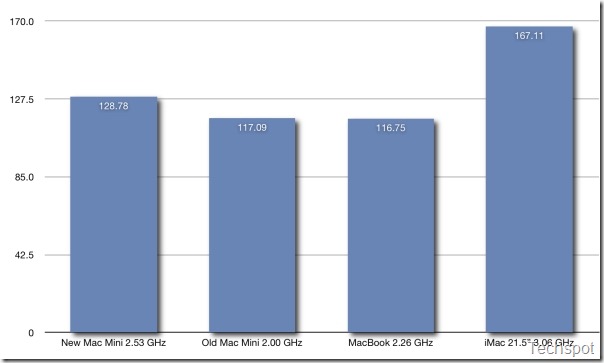
Here are the figures from the XBench and Geekbench benchmarks that we ran on our 2.53 GHz model. We have compared it to the previous generation Mac Mini, the MacBook and the base model of iMac.

108498_bench1 Geekbench Scores (Higher values are better)

108498_bench2 XBench Scores (Higher values are better)

The higher end model that we tested had performance that belied its size. Do remember that this is basically the same hardware that is found in the base model of iMac (except for the hard drive, which is 7200 rpm on the iMac). The fairly powerful processor ensured you can do processor intensive jobs like video/encoding, image editing and watching high definition movies with ease. Also, the abundance of RAM on the higher end model meant that you could run Photoshop with ease. That is some serious power for something that looks no bigger than your average internal DVD drive.
The Mac Mini also has a built-in speaker but considering the size and its internal location, it was not much louder than that of a mobile phone speaker.

108498_outro

For its size the kind of performance that the Mac Mini provides is quite respectable. Apple has updated the hardware and surprisingly kept the price similar to that of the previous generation model, which is not something you see others manufacturers do very often. This makes the new Mac Mini much better value.
The new Mac Mini is priced at Rs. 33,900 for the base model and Rs. 43,900 for the high end model. Many may say that they can assemble a computer at the same price and it would have a more powerful hardware and a monitor, keyboard and mouse included. However, there is no way you can assemble something that has the same small size and design simplicity as the Mac Mini. And nor would it be running Mac OS X Snow Leopard, which is a good enough reason to consider it over anything else. The Mac Mini won't be able to run all the fancy new games that a Windows based assembled PC can at that price, but it surely can do anything else just as well (and some even better), and at the same time look good while doing it.

Nexus One: Hands On

Power and battery

Removable 1400 mAH battery

Charges at 480mA from USB, at 980mA from supplied charger

Talk time
Up to 10 hours on 2G
Up to 7 hours on 3G
Standby time
Up to 290 hours on 2G Up to 250 hours on 3G
Internet use
Up to 5 hours on 3G
Up to 6.5 hours on Wi-Fi
Video playback
Up to 7 hours
Audio playback
Up to 20 hours

Processor

Qualcomm QSD 8250 1 GHz

Operating system

Android Mobile Technology Platform 2.1 (Eclair)

Capacity

512MB Flash

512MB RAM

4GB Micro SD Card (Expandable to 32 GB)

Location

Assisted global positioning system (AGPS) receiver

Cell tower and Wi-Fi positioning

Digital compass

Accelerometer

Size and weight

Height
119mm
Width
59.8mm
Depth
11.5mm
Weight
130 grams w/battery
100g w/o battery

Display

3.7-inch (diagonal) widescreen WVGA AMOLED touch screen

800 x 480 pixels

100,000:1 typical contrast ratio

1ms typical response rate

Camera & Flash

5 megapixels

Autofocus from 6cm to infinity

2X digital zoom

LED flash

User can include location of photos from phone’s AGPS receiver

Video captured at 720x480 pixels at 20 frames per second or higher, depending on lighting conditions

Cellular & Wireless

UMTS Band 1/4/8 (2100/AWS/900)

HSDPA 7.2Mbps

HSUPA 2Mbps

GSM/EDGE (850, 900, 1800, 1900 MHz)

Wi-Fi (802.11b/g)

Bluetooth 2.1 + EDR

A2DP stereo Bluetooth

Buttons, connectors and controls

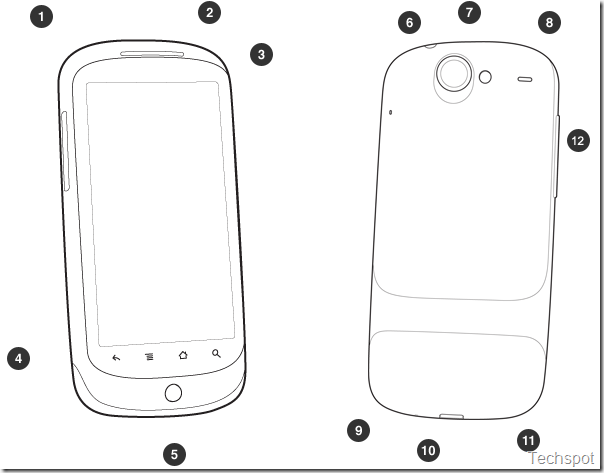
outline_front_back

Front / Top

[1] Power

[2] 3.5mm stereo headphone jack

[3] Charging and notification indicator

[4] Illuminated capacitive soft keys:
Back, Home, Menu, and Search

[5] Tri-color clickable trackball

Back / Bottom

[6] Camera

[7] Camera flash

[8] Speaker

[9] Dock pin connectors

[10] Micro USB port

[11] Microphone

Left side

[12] Volume Control

Additional features
  • Haptic feedback
  • Teflon™ coated back
  • Second microphone for active noise cancellation
  • SIM card slot
  • Micro SD slot
  • Proximity sensor
  • Light sensor

Graphics, video and audio

Audio decoders
AAC LC/LTP, HE-AACv1 (AAC+), HE-AACv2 (enhanced AAC+) Mono/Stereo standard bit rates up to 160 kbps and sampling rates from 8 to 48kHz, AMR-NB 4.75 to 12.2 kbps sampled @ 8kHz, AMR-WB 9 rates from 6.60 kbit/s to 23.85 kbit/s sampled @ 16kHz., MP3 Mono/Stereo 8-320Kbps constant (CBR) or variable bit-rate (VBR), MIDI SMF (Type 0 and 1), DLS Version 1 and 2, XMF/Mobile XMF, RTTTL/RTX, OTA, iMelody, Ogg Vorbis, WAVE (8-bit and 16-bit PCM)
Image
JPEG (encode and decode), GIF, PNG, BMP
Video
H.263 (encode and decode) MPEG-4 SP (encode and decode) H.264 AVC (decode)
Audio encoders
AMR-NB 4.75 to 12.2 kbps sampled @ 8kHz

Leaked Nexus One documents: $530 unlocked, $180 with T-Mobile

(Credit: Gizmodo)

A tipster just sent in these Nexus One screenshots that supposedly confirm two things: that Google will sell it unlocked and unsubsidized for $530, and that Google will sell it itself. Plus, some other very interesting details.

Some of the most important bits of info we extracted (assuming the tipster is accurate, and it seems like he is). Oh, and take a look at our hands on with the device in case you haven't familiarized yourself with it yet.

• Yeah, it's $530 unsubsidized. Google's not going to be selling the phone at cost, like so many people considered. They're not going to save us from the "making money off of hardware" culture we've got right now, so this is basically just another Android handset, albeit a really good one
• If you want it subsidized, you'll have to sign up for a 2 year mandatory contract and pay $180 for the phone
• There's only one rate plan: $39.99 Even More + Text + Web for $79.99 total
• Existing customers cannot keep their plan if they want a subsidized phone; they have to change to the one plan, and this only applies to accounts with one single line
• If that doesn't fly with you, you have to buy the $530 unlocked version--this actually might save you money over two years if you already have a cheap plan
• Family plans, Flexpay, SmartAccess and KidConnect subscribers must buy the phone unlocked and unsubsidized for $530
• You can only buy five Nexus One phones per Google account
• There is language in the agreement of shipping outside the US
• Google will sell it at google.com/phone, which explains what they were doing with that page a few weeks ago
• Google will still call it the Nexus One apparently, and not the Google Phone

And here is a big one:

• If you cancel your plan before 120 days, you have to pay the subsidy difference between what you paid and the unsubsidized price, so $350 in this case. Or you can return the phone to Google. You also authorize them to charge this directly to your credit card.

One weirdness in the Terms of Sale that we quickly glanced through was that Google made sure you acknowledged that the manufacturer is HTC, and not Google.

This story originally appeared on Gizmodo.

(Credit: Gizmodo)

Google wants to build 'white spaces' database

Google has asked the Federal Communications Commission to designate it as one of the administrators of a database for "white space" devices.

For several years, Google has been among the companies urging the FCC to open up the "white spaces"--small amounts of spectrum between broadcast television channels--to unlicensed use. Google joined the White Spaces Database Group in February to help move the project along, since one of the requirements of the white spaces plan is a database that devices can use to figure out which channels are available for use.

At that time, Google's Richard Whitt, Washington telecom and media counsel, said in a blog post that "we don't plan to become a database administrator ourselves, but do want to work with the FCC to make sure that a white spaces database gets up and running." However, Google announced just such a plan Monday evening, revealing its proposal that "the Federal Communications Commission ("FCC" or "Commission") designate Google to be administrator of a TV bands geolocation database."

"Why are we offering to do this?" White wrote in Monday's blog post. "We continue to be big believers in the potential for this spectrum to revolutionize wireless broadband, and we think it's important for us to step forward and offer our assistance to make that vision a reality. Since launching the White Spaces Database Group last February, we've been working with other stakeholders to exchange ideas and perspectives on how to best operate a working database, and we believe we're in a strong position to build and successfully manage one."

There are two types of databases that will be needed for this project: geolocation, which Google has now proposed building, and spectrum-sensing technology. The idea behind the databases is to avoid creating interference with television broadcasts and other wireless technologies.

Reinventing the MacBook Air

How will Apple redesign the ultraslim, seminal MacBook Air that launched dozens of me-too ultraportable laptops? Only Apple knows. But here are some gratuitous musings anyway.

Dell Latitude Z: a 16-inch laptop that's less than 0.8-inches thick and under five pounds.

Dell Latitude Z: a 16-inch laptop that's less than 0.8-inches thick and under five pounds.(Credit: Dell)

In a previous post, I said I wouldn't hazard any guesses on what Apple may do with the MacBook Air. And I won't. That doesn't stop me from looking at the most recent ultrathin laptop competition to see where Apple might be able to improve the design that turns two years old in January.

Enclosure: This will be a tough act to follow. The original design was good enough that Apple didn't change it for gen 2--aka Rev. B--of the Air. And the aluminum enclosure was a trendsetter, which all MacBook Pros (and other PC makers) eventually copied.

But that doesn't mean the Air is perfect. The razor-thin slab of aluminum provides little room for ports and connectors. (Apple's implementation is a flip-out set of USB, Mini DisplayPort, audio ports that retract back into the body.)

A design modification that the Dell Adamo uses (some say retrogressed to) was putting the ports on the back (behind the screen). This allows Dell to offer a fuller array of connectors.

Could Apple come out with a tablet version of the Air?

Could Apple come out with a tablet version of the Air?(Credit: OLPC)

Hewlett-Packard, for its part, went another route: it just made its Envy 13 slightly thicker (at 0.8 inches) than the Air, allowing a couple more connectors (a second USB port and an SD card slot). HP also molded the base of the Envy in magnesium, which makes it lighter, according to HP.

Then there's just-announced Dell Adamo XPS. This is even thinner than the MacBook Air and puts the CPU-complex-plus-circuit-board (aka motherboard) behind the screen, not underneath the keyboard--standard design practice for all laptops.

Sony Vaio X is a good example of how small and thin a premium laptop can be: it has an 11.1-inch screen.

Sony Vaio X is a good example of how small and thin a premium laptop can be: it has an 11.1-inch screen.(Credit: Sony)

Of course, there's the recurring rumor that Apple is looking at different materials to make it even lighter while maintaining its famous sturdiness. This could potentially be a combination of aluminum and something like carbon fiber. (Though, as stated above, HP claims that magnesium is the way to go.)

Other possibilities: make one model bigger (wider), a la the Dell Latitude Z, which offers a 16-inch 1600x900 WLED Display and at its thickest point is only 0.79 inches.

Or make it smaller. The Sony Vaio X is a great example of how light (1.6 pounds) and thin (0.55 inches) a premium laptop (technically it's a Netbook) can be.

Tablet? There is the remote possibility that a version of the Air becomes a tablet. And that would mean potentially a new enclosure and new silicon.

Graphics:. The second feature I'll touch on is graphics. A good graphics chip is tough to squeeze into ultrathin designs and this a major feature that set the Air apart from other slim designs, which use the Intel Graphics Media Accelerator 4500MHD.

The Dell Adamo added a bump at the back, providing more connectors than the Air

The Dell Adamo added a bump at the back, providing more connectors than the Air(Credit: Dell)

Apple, with the Rev. B of the Air, introduced Nvidia 9400M (aka, Ion) graphics silicon. This delivered decent performance and actually made the Air run cooler (I know, I've used both the original Air and Rev. B extensively.)

Let's be clear--the graphics on the original Air was poor. And the source of many gripes about the original design (which proves how important the graphics chip is now). Apple chose to go with Intel's X3100 graphics (they didn't have much a choice in 2007, when design decisions were made), which superheated the bottom of the unit when watching video. My Air would get so hot that I would have to place a large, flat picture book (in effect, a crude heat sink), between my lap and the MacBook Air.

So, what's next after the Nvidia graphics in Rev. B of the Air? There's Nvidia's upcoming Ion 2 graphics, which is still a mystery. I even queried an Nvidia executive about this recently in an interview, but mum's the word. I have confidence that Nvidia will deliver a solid solution that offers an optimal balance between power efficiency and performance.

Nvidia also offers the GeForce G 105M, which is used, for example, in the HP dm3t consumer ultrathin laptop.

My original MacBook Air (R) next to an HP 2510p business ultraportable.

My original MacBook Air (R) next to an HP 2510p business ultraportable.(Credit: Brooke Crothers)

Then there's the ATI Mobility Radeon HD 4330 graphics chip, which Advanced Micro Devices describes as a "thin and light mobile graphics processor...delivering unprecedented performance-per-watt...while watching Blu-ray movies." (The Blu-ray aspect may be overkill for an ultrathin, especially in the case of the Apple, which does not offer Blu-ray drives in its MacBook line.)

This ATI chip has already found its way into an HP ultrathin laptop.

I won't dive into processors here. Suffice to say that Intel continues to expand its variety of low-voltage (e.g., SL9600) and ultra-low-voltage processors (SU9600). Maybe more enticingly, Intel will bring out low-power versions of the Core i series of mobile processors next year. Probably sooner rather than later. This is likely what Apple is targeting for any major revamp of the Air.

Nvidia Tegra 2: The smartbook is a tablet

LAS VEGAS--The smartbook is now a tablet, at least according to Nvidia, whose upcoming Tegra 2 chip will power these mobile computers in 2010.

Device makers using Nvidia's Tegra 2 chip will, for the most part, initially bring out tablets--not classic clamshell designs--according to Mike Rayfield, general manager of Nvidia's mobile business. "A year ago there was a lot of talk about clamshell devices," Rayfield said, speaking in a teleconference before the Consumer Electronics Show. But that's changed, according to Rayfield, because consumers may mistake a clamshell-design smartbook for a Windows-Intel-based Netbook.

"The tablet is a good entree from a (telecommunication) carriers standpoint. It would avoid confusion of people getting clamshells and assuming they're getting a Windows PC," he said. On the CES floor, Nvidia was showing prototype tablets using its new Tegra 2 chip(Credit: Brooke Crothers)

Rayfield described the devices as having "screen sizes between 5 and 10 inches, all touch-capable...most of them are very thin, well under an inch," he said, adding that they will have one or two cameras, Wi-Fi, and 3G, among other features.

Tegra 2 will provide full high-definition Web streaming and Flash (Adobe) acceleration. "Tegra 2 is in production. Hundreds of development systems [are ]out in the wild. You'll see devices with Tegra 2 in the marketplace in 2010," he said. Some tablet makers will go direct through retail, some through carriers, Rayfield said.

"The GPU (graphics processing unit) is used extensively in flash acceleration. We believe that will be a significant differentiator," he said, speaking about the Tegra 2's graphics component, a strong suit for Nvidia.

Google muses about ads in Street View

It might have been just a trial balloon, but last year Google floated the idea of putting ads in Street View.(Credit: Google)

Could virtual billboards one day show up in Google Street View?

A few months ago, Google gave a presentation to marketing and ad agency types in Europe as part of an event called "Above and Beyond 2009," an educational seminar/infomercial on how Google can help get their clients' messages out to the public. One of the presentations was on the exploding opportunities in mobile advertising, something with which Google is clearly obsessed these days.

In the presentation, Google tossed out the notion that ads may one day appear in Street View, the feature in Google Maps that lets searchers navigate down an ever-increasing number of city and town streets around the world. Those ads would be tied into the listings in the Google Local Business Center and the Google Favorite Places program, which lets participating merchants put signs in their windows with bar codes leading to additional information or special offers.

A Google representative said the company had no current plans to put ads in Street View but noted that Google has already added a link to Street View in the Local Business Center listings that pop up in Google Maps. The convergence of local search, mobile computing, and navigation is one of Google's larger priorities for the upcoming year

HP, Toshiba 'Core i3' laptops not pricey

Thought that the newest laptop technology is always priced at a premium? Think again. Due in the next few weeks from Hewlett-Packard, Toshiba, Gateway and a host of other PC makers, some of the first laptops using Intel's new Core i3 processor will be priced as low as $700.

At the Consumer Electronics Show, which starts January 7, PC makers will debut laptops using Intel's freshly minted Core i3 processor, as was previously reported. Core i series processors are based on Intel's Nehalem microarchitecture. In 2010, the chipmaker will move most of its processor lines from the current Core 2 technology to the Core i design.

Core i3-based laptops are, in a word, cheap. Cheap in the context that these are systems using a brand new processor based on a new Intel microarchitecture--in the past, this kind of technology has commanded a steep premium. A system from HP now posted on online retailer eCost is priced at $865. And a Gateway laptop listed on Canadian retailer Future Shop is priced at $730 Canadian dollars or about $694 U.S. dollars.
And add a Toshiba system to the mix (priced at $799 Canadian dollars or about $763 U.S. dollars). The Toshiba Satellite (PSLS6C-00F005) packs the same Core i3 processor but uses a 16-inch screen, according to a posting on Future Shop.

HP Core i3-based Pavilion laptop (WA786UA#ABA) as listed by eCost:
•Processor: 2.13GHz Intel Core i3-330m
•Display: 15.6" LED
•Memory: 4096MB DDR3
•Hard disk drive: 320GB 7200rpm
•Optical drive: DVDRW
•Operating system: Windows 7 Professional 64-bit
•Video card: Intel Integrated Graphics Media Accelerator HD
•Price listed by eCost: $864.99

The $694 Gateway system has the same screen size (listed with a 1600 x 900 native resolution) and memory configuration as the HP laptop but ups the ante with a 500GB hard disk drive and, most interestingly, uses an as-yet-unannounced ATI Mobility Radeon HD 5470 graphics chip instead of Intel's graphics silicon.

Gateway Core i3-based laptop is below $700(Credit: Future Shop)
Product specifications aside, one of the most anticipated laptop technologies at CES this year is Arrandale, the codename for Intel Core i series mobile processors targeted at the mainstream laptop market. The Arrandale-based Core i3 is the first mainstream Intel laptop processor to combine two processor cores and a graphics function together in one chip package (previously, the graphics chip was in a separate chipset), resulting in better overall power efficiency.

And the new built-in graphics technology will offer better graphics performance than current technology, according to Intel. The chipmaker will try in earnest to prove this at CES with plenty of demos showing off Arrandale's graphics prowess. (Though not all PC makers are convinced that Intel's new graphics technology is the way to go, as evidenced by Gateway's decision to use a discrete ATI graphics processor from Advanced Micro Devices).

One thing worth noting is that the Core i3 won't have Turbo Boost technology, which speeds up and slows down individual cores to meet processing and power-efficiency needs, respectively. This will only be offered in higher-end Core i5 and i7 processors--including Arrandale i5 models. However, the Core i3 will have Hyper-Threading, which can double the number of tasks--or threads--a processor can execute. This is not offered in current Core 2 chips.

What you get (pros) and don't get (cons) with the Intel Core i3 mobile processor:
•Pro: graphics built directly into the CPU, which means better overall power efficiency
•Pro: improved graphics performance over current Intel 4500MHD graphics silicon
•Pro: Hyper-Threading
•Pro: Intel's newest 32-nanometer chip technology
•Con: no Intel Turbo Boost
•Con: not four cores, only two
•Con: relatively small cache memory size

Dell laptop using Intel Core i3

The newest crop of notebooks and Netbooks are not just leaking but beginning to flood out of reseller sites. The latest: a Costco Canada posting of an upcoming Dell Inspiron laptop based on Intel's Core i3 processor.

Costco's Dell Inspiron with Intel Core i3 chip (Credit: Costco)

At the Consumer Electronics Show, which starts on Thursday, PC makers will debut laptops using Intel's freshly minted Core i3 processor, as was previously reported. Core i series processors are based on Intel's Nehalem microarchitecture. The Core i3 is the first Nehalem chip targeted at mainstream and lower-cost laptops.

The Dell offering, at least as posted at Costco, is a bit more expensive than other leaked models from Gateway or Hewlett-Packard, so we'll have to see how pricing shakes out in the coming the weeks. And note that Costco lists the Intel processor as the "future Core i3 processor," and further states that "all orders will ship the week of January 17, 2010."

Dell Inspiron as listed by Costco:
•Processor: Core i3
•Display: 15.6" TFT
•Memory: 4096MB
•Hard disk drive: 320GB 7200rpm
•Optical drive: DVDRW
•Operating system: Microsoft Windows 7 Home Premium 64-bit
•Video card: Intel Integrated Graphics Media Accelerator HD
•Price listed by Costco: $1,029.99 Canadian dollars or about U.S.$983.

Chrome Passes Safari In Browser Usage

In its 15th month of public existence, Google's Chrome browser surpassed Safari for share of worldwide usage in December.

Chrome jumped from 3.9 percent to 4.6 percent of usage, according to statistics that analytics firm Net Applications publishes based on the 160 million monthly visitors to the network of Web sites using its services. Safari increased from 4.4 percent to 4.5 percent.

Chrome passes Safari for third place in browser usage in December. (Credit: Net Applications)

Chrome's jump came as Google released the first beta version of its browser for Mac OS X and Linux computers. Previously only a developer-preview version was available.

As of last month, Google had been scheduled to graduate the Chrome 4.0 beta version to "stable" on January 12, but mention of that release date has now been removed from the Chromium development calendar. One possible hitch: the Mac beta version and the present Mac developer-preview version don't yet support one key feature of the newer 4.0 incarnation of Chrome: extensions. That means the feature, which lets people customize what the browser can do to some extent, has yet to receive widespread testing on Mac OS X machines.

Also according to Net Applications' statistics, Microsoft's Internet Explorer continued its steady slide, dropping from 63.6 percent to 62.7 percent usage. Most of IE's share loss has been picked up by No. 2 Firefox, but that open-source browser slipped from 24.7 percent to 24.6 percent from November to December.
Better news for Microsoft, and for Web developers who loathe supporting the IE 6 browser first released in 2001: IE 8 has almost edged the older browser aside as the top browser version in use.

IE 8 rose in usage from 19.3 percent to 20.9 percent from November to December, while IE 6 dropped from 22.1 percent to 21 percent.

After crushing Netscape in the first browser wars of the 1990s, Microsoft grew complacent. But the arrival of Firefox and growing usage of other browsers has re-energized the Internet Explorer team.

Windows 7 Mobile

Windows Mobile 7 is clearly designed for better media playback, with screenshots indicating a much-improved Media Player and photo gallery application. Mobile Internet Explorer runs full-screen web pages in a minimalist interface, and has "tabbed" browsing, except you can switch tabs by shaking the phone.

Windows Mobile 7
Music player and image gallery

Windows Mobile 7

Internet Explorer works with shakes

Windows Mobile 7

Juggling images

The OS will dynamically resize elements of the user interface, prioritizing them and making them easier to hit. Corners, like the close button, scrollbars, icons and the title bar/status bar, will all be able to grow to make things easier on the user.

Windows Mobile 7

Waking up the device

Windows Mobile 7

Waking up transition effects

Gestures for scrolling (horizontal and vertical), task and menu access, press and hold controls, list items, press and drag, and launching shortcuts will also be available. The Windows Mobile 7 device will also be able to detect finger velocity, scrolling further if the user's finger moves faster.

When the user flicks to scroll within a list, a scroll handle will appear on the side. If the user touches it, the user can drag the scroll handle up and down for faster scrolling. This replaces the scroll bar. The more the handle is moved, the faster the screen will scroll.

Windows Mobile 7

The new Windows Mobile application • scrolling with the scroll handle

When using the keyboard, the letter enlarges and appears above your finger when you hit it, just like on the iPhone. When highlighting text, a zoom/edit box appears above it to show what you are highlighting. When in full page view in IE Mobile, if you hit an area with links it will zoom in with a bubble and help you choose from the links.

Windows Mobile 7

Zoom bubble in IE • iPhone-style virtual keyboard • highlighting text in Word

Motion Gestures

There will be various finger motion gestures, used for scrolling vertically and horizontally, task and menu access, pressing and holding on controls, list items, pressing and dragging, and launching shortcuts.

Some UI elements, called Spinner and Pivot, will have a gesture where you swipe them from left to right. In a Spinner, you have a single item with left and right buttons next to it, but instead of hitting the left and right buttons, you can just swipe to change the option.

There will also be motion gestures, where the user moves the device to invoke certain commands. Microsoft Research has a technology concept that uses the device's camera as a motion sensor, enabling motion control while using the device. It will also support changing screen orientation when turning the device sideways, just like the iPhone does, but using the camera, not an accelerometer. These gestures will require the camera to be operating all the time a gesture may be used, which will affect battery life. And we couldn't help but scratch our heads how this will work in pitch dark environment.

There's also a part talking about allowing the user to "doodle" on the screen, letting users draw doodles on the device lock screen, as well as shake the screen to affect the wallpaper (like making water run, or blurring an image). The iPhone's lock screen is an iconic part of the device, and Microsoft wants to have a cool lock screen without copying Apple, so the plan is to give you fun things to do on the lock screen.

Windows Mobile 7 Windows Mobile 7

"Doodling" on the main unlock screen

There's a list of gestures that are being explored and may or may not make it into Mobile 7, including a gesture to dismiss an on-screen notification by shaking it off the screen, a gesture to automatically take you to a Smart Search notification panel, turning the phone like turning a key to unlock it, Pivoting by gesturing the phone sideways, moving through lists by shaking the phone up or down, switching the camera into black and white or other modes by shaking it down, adjusting camera aperture and shutter speed by rotating the camera, sending a file by "tossing" it to another device.

Windows Mobile 7

Pivoting through system tabs with shakes

Windows Mobile 7

Applying camera effects with gestures

Microsoft clearly has a lot planned to make Windows Mobile 7 the revolution it needs to be to compete with Apple, and Windows Mobile 7 is going to bring some cool and excitement to Microsoft's smart phones. Too bad we are going to have to wait for it at least a year more

For sale: Your robot clone

Japanese robot maker Kokoro, best known for its Actroid line of ultra-lifelike androids, will make robot clones of people in a special limited-time offer.

The New Year promotion is being offered via select department stores in Japan. People willing to pay about $225,000 can have themselves recreated in robot form, with their robot clone having exactly the same face, hair, eyes, and body.

Kokoro will also model the buyer's voice, facial expressions, and upper-body movements to create the most lifelike doppelganger possible.

The Actroid and Geminoid androids are powered by a quiet air servo system that moves their upper bodies. They cannot walk.

Both are based on real people--one version of Actroid was based on a Japanese newscaster, and Geminoid is based on Osaka University roboticist Hiroshi Ishiguro.

Kokoro is only offering to make two robot clones. If more than two orders are received, the lucky buyers will be selected by lottery.

Web Closer To 3D Reality

3D graphics became ordinary first in games, then in operating systems, and on Thursday, it took a significant step toward being built into Web browsers as well.
The Khronos Group, which oversees the OpenGL graphics interface, announced that its work with Mozilla to bring hardware-accelerated 3D graphics to the Web has reached draft standard form. The standard, called WebGL, lets programmers who use the Web's JavaScript language take advantage of the fact that video cards can handle 3D graphics with aplomb.
The group now wants commentary from Web developers and others who might be involved with WebGL so it can be finalized. "I anticipate us moving toward a spec that is not provisional, not merely a draft, in early 2010, the first quarter," said Arun Ranganathan, chairman of the WebGL working group and standards evangelist at Mozilla.
Internet Explorer remains the dominant browser in terms of usage, but all four of its main challengers--Mozilla's Firefox, Apple's Safari, Google's Chrome, and Opera Software's Opera--are working hard, sometimes in an informal alliance, to get ahead by advancing the Web state of the art.
WebGL fits into that effort, and not just academically. All four of those browser makers have endorsed WebGL, and developer test versions of Firefox, Safari, and Chrome have it built in. Microsoft declined to comment for this story beyond reiterating its general support for standards.
Ultimately, building 3D support into the Web could advance user interfaces of Web applications--including games, the popularity of which can be a powerful incentive for upgrading to the latest technology.
It's not clear exactly how it will play out, though, Ranganathan said. The arrival of Canvas, an advanced 2D interface for browsers, has led to a blossoming of graphics work, and he expects a similar change with 3D graphics.
But don't hold your breath for Web-based first-person shooters that rival native applications. First, even if 3D is accelerated, there are plenty of other processing and user interface constraints on Web applications. Second, even after WebGL is standardized, it must be built into browsers, people must upgrade to those new versions, and programmers must learn how to support the technology.
WebGL isn't the only 3D Web work under way. Google has its own O3D project, which currently is a browser plug-in but that the company also is building directly into Chrome.
O3D is a higher-level interface, though, not a direct competitor. Details are technical, but O3D uses a retained mode approach to WebGL's immediate mode interfaces.
And of course, a decade ago there was VRML--virtual reality modeling language, a file format rather than interface. A VRML successor called X3D, though, can actually make use of WebGL, and indeed a project called X3dom aims to do just that.